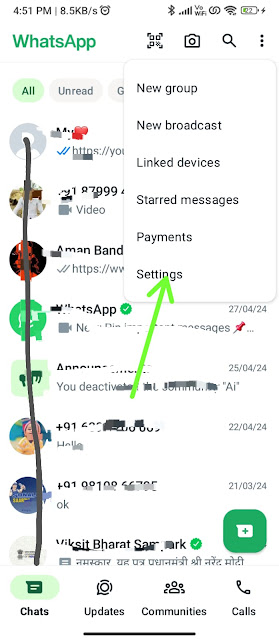
HOW TO CREATE AVTAR IN WHATSAPP


Create an avatar manually

You can easily create an avatar within a chat by tapping 
emoji
, then 
 to get started. You can also create an avatar in your Settings by following these steps:
  1. Tap
    more options
    , then Settings.


  2. Tap Avatar, then tap Create your Avatar.
  3. Tap Get started.
  4. Select a skin tone and tap Next.
  5. Personalize your avatar’s appearance.
  6. Tap Done.
Create an avatar with a photo
Taking a photo automatically generates an avatar, which you can personalize.
  1. Tap
    more options
    , then Settings.


  2. Tap Avatar, then tap Create your Avatar.
  3.  
  4. Tap Get started.
  5. Tap Allow camera, then Take photo.
  6. Tap the camera to take a photo.
    • You can either retake your photo or create your avatar manually.
  7. Tap a skin tone, then tap Next.
  8. Tap Make more edits or tap Done.
Note:
  1.  Creating an avatar on WhatsApp is optional.
  2. To suggest an avatar that more closely resembles you, WhatsApp will process a photo and the parts of your face or body features in the photo.
  3. If you like, you can use the avatar editor to customize your recommended avatar before selecting your final avatar.
  4. You can delete your avatar at any time. Deleting your avatar is permanent and can’t be reversed.
  5. Your photo won’t be used for any other purpose and will begin being processed for deletion immediately.

Comments

Popular posts from this blog

Mswipe technical support

   If you have to face a problem on your terminal then contact this no 18001022699. Now I tell you some basic problems in Mswipe terminal:- Network issue :-   1) Firstly you check your sim card is activated or not. 2) then you check the sim card proper inserted in your device. 3) then you check the mode of device if your device is standalone mode then check GPRS Test.                                                                                          System halt :- 1)  in this case your terminal shows some numbers on a screen or shows hf reset or hang your device. 2)  if you have the above type problem then call customer care no. 18602662699 3)  if not response then send mail in this Email helpdesk@mswi...

How to set wifi in mswipe terminal

How to set WiFi:-     Followed by these steps in your device:- 1)  On G2/G2 plus device if 2) Again press on/off  button  3)Press Down key one time 4)Press 2 number and select WIFI SETTING 5)Press 1 for set name your SSID(wifi name) For selecting capital alphabet use this keyword 2(up), 4(left), 6(right), 8(down), 5(select) for small case alphabet press down key for numbers again press down key for symbols press down key after press enter button. 6) Press 2 number for the password  set and do the above selection process For selecting capital alphabet use this keyword 2(up), 4(left), 6(right), 8(down), 5(select) for small case alphabet press down key for numbers again press down key for symbols press down key and then press the enter button Now check the connection option which option is selected     if a star is on wifi then the...

How to request your account information

The request account information feature allows you to submit a request for and export a report of your WhatsApp account information and settings. The report won’t include your messages or information about channels or channel updates. To access your messages, you can  export your chat history  instead. To access your channels information, you can request a copy of your channels report. Learn how in  this article . Please note, this feature isn’t available on WhatsApp for Windows. Request report Go to WhatsApp  Settings  > tap  Account  >  Request account info . Tap  Request report . The screen will update to state  Request sent . Your report will typically be available three days after the date you requested it. You can refer to the  Ready by  date while waiting for your report. Create reports automatically You can request to automatically create a report every month. Go to WhatsApp  Settings  > tap  Acc...